2: Overview: Version Control, Git, GitHub, and GitHub Desktop#
What is Version Control?#
Version control is a system that records changes to a file or set of files over time so that you can recall specific versions later. It allows multiple people to collaborate on a project, keeps track of every modification to the code, and can help revert to a previous version if necessary, but even if you are working alone, it can make things so much easier:
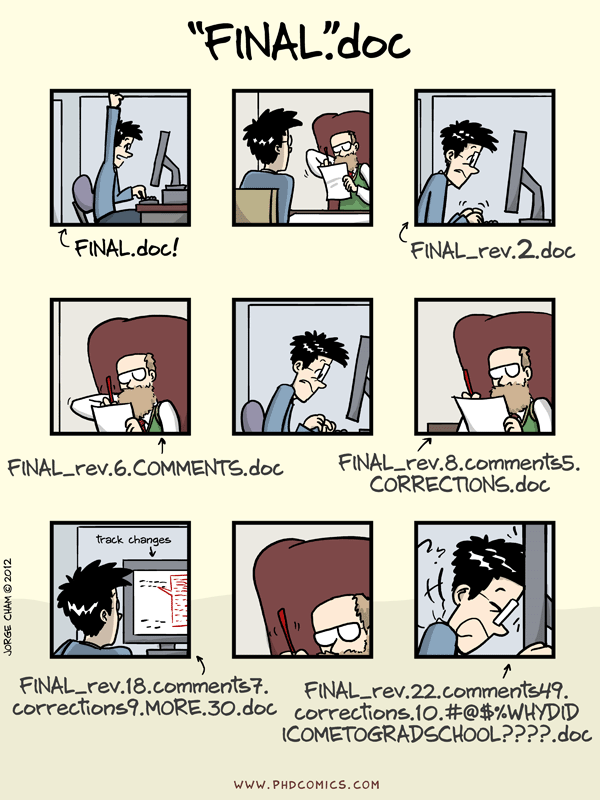
Key Features of Version Control:#
History Tracking: Keeps a record of every change made to the files.
Collaboration: Multiple people can work on the same project simultaneously without overwriting each other’s work.
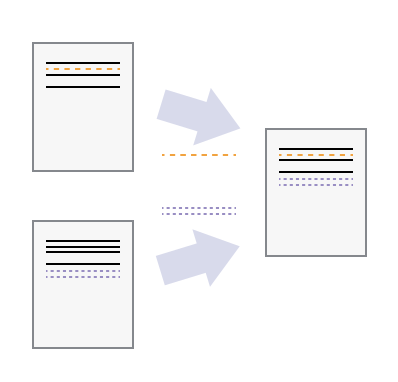
Branching and Merging: Allows you to create branches to work on different features or fixes independently and merge them back into the main codebase when ready.
Backup and Restore: Helps in restoring files to a previous state in case of accidental deletion or errors.
What is Git?#
Git is a distributed version control system designed to handle everything from small to very large projects with speed and efficiency. It allows developers to track changes, revert to previous stages, and work simultaneously on multiple branches.
Key Features of Git:#
Distributed System: Every developer has a complete history of the project on their local machine.
Performance: Fast and efficient handling of projects of any size.
Branching and Merging: Flexible branching and merging capabilities, making it easier to experiment and integrate new features.
Integrity: Ensures the integrity of the code by storing every change in a cryptographic hash.
Why Should You Use Version Control and Git?#
Collaboration#
Version control allows multiple developers to work on the same project simultaneously without overwriting each other’s work. Git makes it easy to merge changes and resolve conflicts.
History and Backup#
Every change made to the project is recorded, providing a complete history of the project. This is crucial for understanding what changes were made, by whom, and why. It also acts as a backup, allowing you to revert to previous versions if needed.
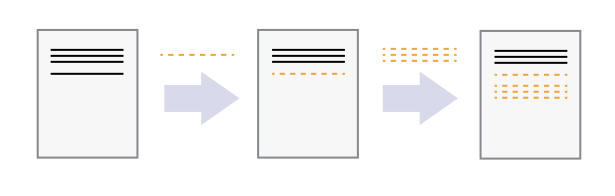
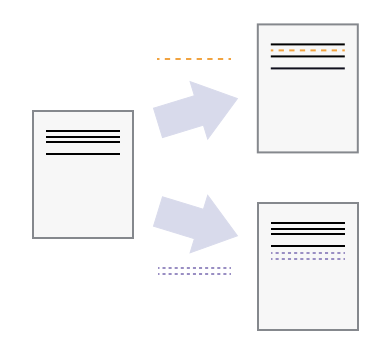
Branching and Experimentation#
Git allows you to create branches to work on new features, bug fixes, or experiments without affecting the main codebase.
Once the work is complete and tested, you can merge the branch back into the main codebase.
What is GitHub?#
GitHub is a web-based platform that uses Git for version control and provides a collaborative environment for developers. It hosts your repositories and allows you to manage your projects with additional features such as issue tracking, project management tools, and continuous integration.
What is GitHub Desktop?#
GitHub Desktop is a user-friendly application that provides a graphical interface to interact with Git and GitHub. It simplifies the process of managing your repositories, making it accessible even for those who are not familiar with the command-line interface.
GitHub Desktop Alternatives#
While GitHub Desktop is a popular choice for beginners, there are other Git clients available that offer similar or more functionality. Your text editor or IDE probably has Git integration that can do everything GitHub Desktop can do and more for free. There are also GUI clients like GitKraken, Sourcetree, and others, that do a lot more than GitHub Desktop, but those are often paid. We had to choose a common tool for everyone regardless of what text editor or IDE they use, and GitHub Desktop is a good basic choice for that.
Most of these tools and functions in this tutorial will be similar across different Git clients, so after this tutorial, you can explore other tools, try out a git extension in your text editor or IDE of choice, or even use the command line if you prefer.